
One connected foundation
CRM contacts and companies connect to the workflows that use them. Fewer separate lists. A clearer view of the relationship.
THE MODULAR BUSINESS PLATFORM
Less switching. More perspective. Bring your relationships, communication and operations into one workspace—built around the way you do business.
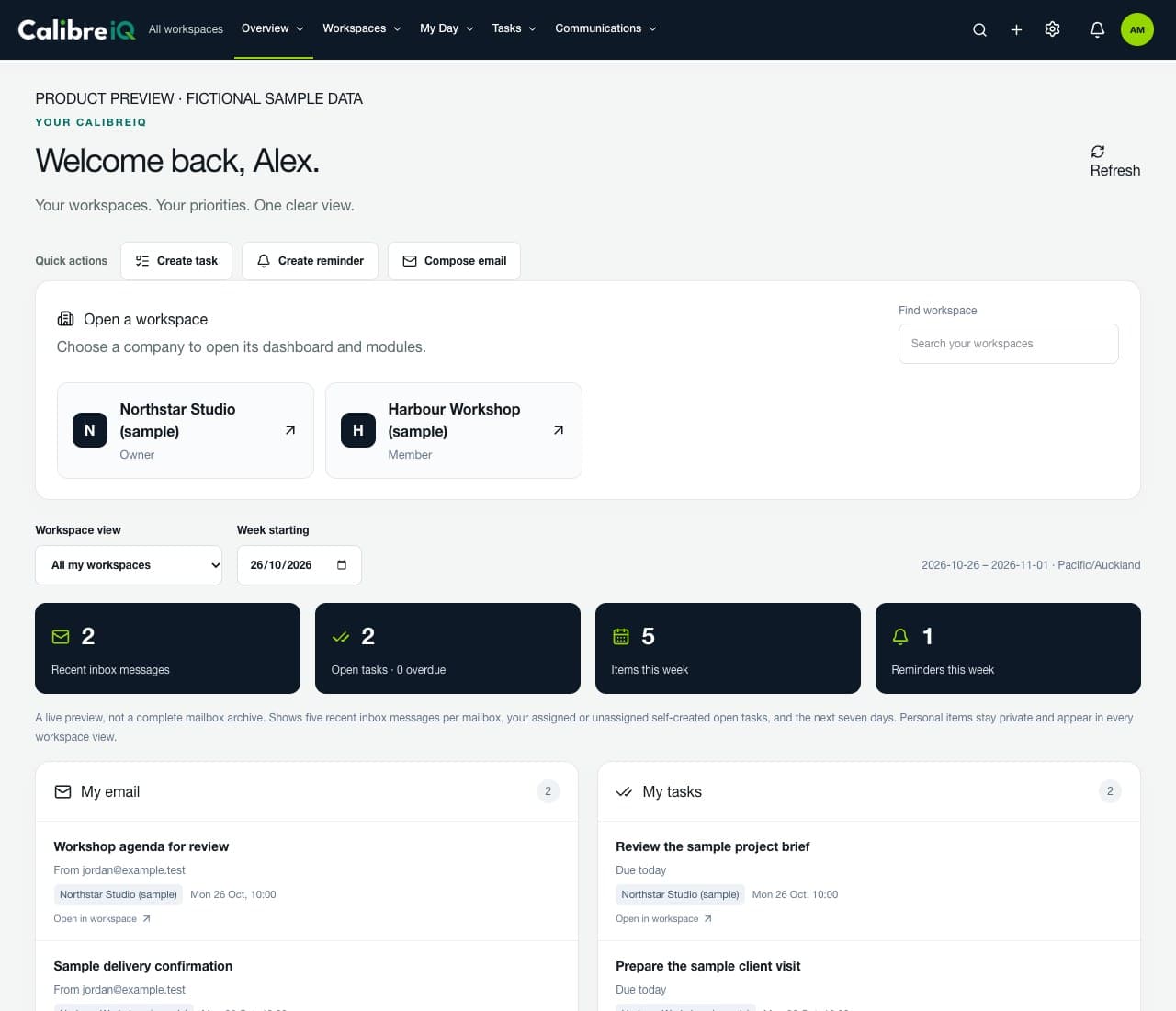
Actual CalibreIQ interface · fictional sample data
Modular by design
Built for multiple organisations
Permission-aware access
A MORE CONNECTED BUSINESS
Good businesses don’t operate in silos. Your software shouldn’t either. CalibreIQ brings your essential tools together around shared relationships and clearly defined workspaces.
CRM contacts and companies connect to the workflows that use them. Fewer separate lists. A clearer view of the relationship.
Configure modules and features around your organisation. Keep the experience focused, without making every user navigate every tool.
Separate organisation workspaces and individual permissions keep the right information with the right people.
EXPLORE YOUR PLATFORM
A considered toolkit for customer relationships, daily operations and what comes next. Explore the product areas below, including the setup each one needs.
12 product areas · Availability depends on workspace configuration and user permissions.
WORKSPACES & PRODUCTIVITY
See permitted email, tasks, calendar items and reminders together, then open the business you need without mixing its data.
CRM
Keep contacts, companies, opportunities and pipelines connected. Reuse CRM contacts across your workflows instead of building disconnected lists.
EMAIL & SMS
Connect separate Microsoft 365 accounts and permitted shared mailboxes. Work with email and run CRM-connected SMS workflows.
ACCOUNTING
Prepare invoices, review receivables and record payments in the right organisation. A focused invoicing workflow—not a promise to replace your entire general ledger.
MARKETING
Build campaign records, audiences, forms and consent-aware workflow definitions around the customer information you already hold.
ROUTES
Choose visits from your day or build a route manually. Plan a practical order around stop durations and appointment constraints, then hand navigation to Google Maps.
LEARNING CENTRE
Give learners access to courses, lessons and quizzes, with individual results and course-based access. Course purchases and payment configuration are separate.
BUSINESS IDEAS
Capture private ideas, develop research and shortlist names and domains. Review AI suggestions and explainable scores before saving changes to your idea.
PERSONAL TOOLS
Keep favourite places, personal reminders and health-and-fitness records organised, with user-private tools distinct from shared business information.
AI WORKFORCE
Configure AI employees, approved knowledge, tasks and human approvals. The AI receptionist is staged behind safety gates; production calling is not generally enabled.
INTEGRATIONS & API
Give approved systems narrowly scoped access through the CalibreIQ backend. Keep reading, editing and sensitive actions separate with revocable credentials.
ADMINISTRATION
Manage identities centrally while assigning organisation membership, module access and permissions individually. Administration stays separate from day-to-day workspace work.
A CLOSER LOOK
Explore actual CalibreIQ screens populated with fictional sample records. No customer information, live accounts or invented performance metrics.
Bring permitted work into one overview, then open the workspace you need.
CONNECTED IN PRACTICE
Keep the context as work moves between people and modules. These are examples of workflows you can configure—not promises of unattended automation.
Capture a contact, track an opportunity and give the next conversation a clear owner.
CRM → Email → Follow-up taskSee your calendar and tasks, choose the visits that matter and plan a practical day.
Overview → Calendar → RoutesPrepare an invoice, review what is outstanding and record the payment in the correct business.
CRM → Invoicing → ReceivablesA FOUNDATION YOU CAN BUILD ON
Use approved integrations without handing every connected system unrestricted access to your business.
CHOOSE YOUR WORKSPACE
MANY BUSINESSES. ONE IDENTITY.
Work across the organisations you belong to without mixing their data. Each workspace has its own modules, people and permissions, accessed through one CalibreIQ identity.
A PLAN FOR YOUR NEXT CHAPTER
Use these starting points to plan your CalibreIQ setup. We’ll confirm the right modules, users and commercial terms for your business.
Indicative guide · NZD · excludes GST
Focus your day and organise your customer relationships.
Per organisation · billed monthly
Explore Essentials setupSuggested module configuration
Bring relationships, communication and operations together.
Per organisation · billed monthly
Explore Business setupSuggested module configuration
A connected foundation for more complex organisations.
Per organisation · billed monthly
Explore Group setupSuggested module configuration
A tailored configuration for complex operations and specialist workflows.
Modules, users and rollout by agreement
Explore Enterprise setupTailored configuration
These are illustrative starting prices, not a binding offer or an active subscription checkout. Final module scope, user allowances, onboarding and pricing are confirmed before purchase. Messaging, calling, Microsoft 365, mapping and course charges are separate where applicable. Annual examples assume a 12-month upfront payment.
Configuration guide only—not a contractual feature or user allowance. Availability, access and any additional charges are confirmed in your proposal.
| Capability | Essentials | Business | Group | Enterprise |
|---|---|---|---|---|
| Workspace roles, CRM and daily work | Core focus | Core focus | Core focus | Tailored |
| Email, SMS and marketing | Discuss | Suggested | Suggested | Tailored |
| Invoicing and receivables | Discuss | Suggested | Suggested | Tailored |
| Learning, Routes and Business Ideas | Discuss | Discuss | Suggested options | Tailored |
| Multiple organisations and external API | Discuss | Discuss | Configuration focus | Tailored rollout |
| AI Workforce | Controlled rollout | Controlled rollout | Controlled rollout | Eligibility review |
| Users and workspace allowances | By agreement | By agreement | By agreement | By agreement |
Microsoft licences, SMS/carrier and telephony charges, AI usage, mapping requests and paid courses are separate where applicable. There is no unlimited usage claim or included AI calling allowance.
Onboarding, data migration, custom integrations, additional organisations and support terms are confirmed separately. Group is a configuration guide per organisation—not unlimited workspaces for one fee.
Multiple entities, specialist integrations or a hands-on rollout? Let’s shape the right solution.
Not as a self-service activation. AI Workforce is a controlled rollout. Live transfer, fallback routing, caller privacy and post-call processing must pass the release gate before a production number is connected. AI and telephony usage are separately scoped.
The current focus is invoices, receivables, payment records and connected workflows. It is not a complete general-ledger or tax-filing replacement. Quotes, purchase orders, expenses and tax workflows are planned extensions.
Business Ideas can use selected, authorised idea context for AI assistance and scoring. Review proposed changes before saving them. Scores are analysis, not guarantees of business success. AI requires server-side configuration and usage funding.
Yes. CalibreIQ separates organisation module availability, enabled features and user permissions. Start with the tools your business needs, then discuss additional capabilities as you grow.
Yes. A person can belong to more than one organisation and switch between the workspaces they can access. Their role and permissions are evaluated within each organisation.
No. Sign-up creates your CalibreIQ identity. Organisation access, module configuration and any commercial agreement are arranged separately. The pricing shown here is an indicative guide, not a checkout.
The guide shows a 20% reduction on the illustrated platform price when paid upfront for 12 months. Third-party usage, licences, courses, setup and any custom work are excluded. Final terms and amounts must be confirmed before purchase.
CalibreIQ supports Microsoft 365 email connections, Leadz.co contact integration and a versioned, scoped external API. Each provider may require its own licence, permissions and configuration. Integration scope is agreed during onboarding.
No. A feature must be available to the organisation, enabled in its workspace and permitted for the individual. Some modules and integrations require additional setup. Features under development are not included as ready-to-use services.
YOUR NEXT CHAPTER STARTS HERE
Create your CalibreIQ identity or explore the sample workspace before discussing your configuration with the Calibre team.
Already working with Calibre? Ask your usual contact for a module and pricing proposal. No payment is taken on this page.